Saturday, April 14, 2012
Computer Repair Business Start to Finish
In the coming weeks I will be working on alot of blog posts that will involve things that happened to me during the time that I had my successfull computer repair business. Some things to try, some things to avoid... If you are going to be starting a computer repair business, or even if you have had one for awhile... I'm sure there will be something in these posts that you will find usefull and profit making. I guarantee that it will help your business grow.


CGrafiks is Closed
I am sorry to break this news to you, but I have closed down the CGrafiks business. I want to thank all of you for your continued support over the years.
THE REASON FOR MY DECISION:
It started when I found out in July 2010 that I am a Type 1 insulin dependent diabetic, and my health took priority over everything. In 2011 I decided that I had to start trying to better my health and take care of myself better. I tried to get insurance at that time but since i now have a pre-existing condition nobody will insure me for a decent price. When your young you think your invincible and don't need insurance,... until something bad happens at least. So I took on a full time job in the Cumberland County School System in October 2011 because they offered me health insurance. As many of you know, I had worked at the Technology Center part time for 4 years before taking the job at the Cumberland County Schools and was able to manage the business and the Tech Center without too much problem .... but now the stress is building up on me, and I have to make a decision.
SO WHAT DOES THIS MEAN?
I will be keeping my full time job in the school system and will shut down my business as soon as possible. Don't worry...I will still warranty any new parts that you may have purchased from CGrafiks. I am still going be avaiable after 4pm to do computer work for my existing customers and will take on new customers if they are ok with my new arrangements. However the time frame will not be a day or two to repair like it is now. It will depend upon my availability and will be on a Call for Appointment basis. I will no longer accept checks, debit or credit cards as payment. The office phone # will be disconnected and the only way to reach me will be by cellphone at 931-335-0398 Mon-Friday 4pm - 6pm. I know that's not a very big window and I expect many of you will find another computer repair tech to service your computers. I understand that completely and I'm sorry that I can no longer help you in a timely manner. If you are willing to wait a few days for the repair to be done, then I will be happy to still help you. I will not be carrying parts in stock anymore, so you will have to order your computer parts as needed. I will still do the labor and help you decide on what parts you need.
I'm sure this is coming as a shock to many of you.... and I'm sorry for that. There has been alot going on this past year, and this is unfortunately what I have to do. If you have any questions, comments, or complaints please let me know. I will try to still serve you as needed until all the warranty periods expire.
Saturday, July 30, 2011
Ipod and Iphone Repair
We have the tools and are slowly gaining the knowledge required to repair ipods and iphones. We have successfully took apart 3 now and repaired them.
CGrafiks Computer Service Www.CGrafiks.Com (931)337-0023 / (931)335-0398 Tech@CGrafiks.Com
CGrafiks Computer Service Www.CGrafiks.Com (931)337-0023 / (931)335-0398 Tech@CGrafiks.Com
Thursday, May 19, 2011
Playstation 3, Xbox, Ipods and Phones
I guess we are starting to expand a little in to other fields. We fixed a PS3 today with video problems. It needed an internal cleaning BAD! THen we had to fix a black screen by resetting the video output on the device.
STEPS:
Turning It On -
Pressing and Holding the power button down for 3 beeps -
Light will go red - Then turn it back on again and wait.
It will reset the video and not show a blank black screen anymore!
STEPS:
Turning It On -
Pressing and Holding the power button down for 3 beeps -
Light will go red - Then turn it back on again and wait.
It will reset the video and not show a blank black screen anymore!
Monday, April 18, 2011
GPS in Cellphones/ Smartphones
Cellphones are underestimated. I took a trip the other day and needed directions on the fly. I was out of Crossville and didn't know which way to go, so I turned the GPS capability on in my cellphone, and downloaded a free app from Blackberrys AppWorld and whala! A perfect GPS that talked to me and everything! It showed the estimated time till arrival, the total miles till the destination, etc. I was impressed. Who needs an expensive GPS system when your smartphone can do it all!
Sunday, March 27, 2011
Internal Computer Cleaning Event - April 5th 12pm-6pm
Time Tuesday, April 5 · 12:00pm - 6:00pm
-----------------------------------------------------------------------
Location CGrafiks
430 County Garage Road
-------------------------------------------------------------------------
HOW DUSTY IS YOUR COMPUTER?
Spring Cleaning Time! - You won't believe how dirty your computer can get in just a few months! Did you know that Overheating is the Leading Cause Of Death in computers? Whens the last time you looked inside yours? Did you know that with a little inexpensive maintenance, once a year, you could dramatically increase the lifespan of your computer!
INTERNAL CLEANING PC DAY!
...ONLY ONE DAY! Beginning at NOON - and - Ending at 6pm
Normal Value ($40 Laptop Systems) and ($20 Desktop Systems) each
SPECIAL ONE DAY PRICE - $9.99 Desktop System / $24.99 Laptops!
INSTANT SAVINGS! - No Limit! - No Appt Necessary but RSVP Preffered.
APPROX TIMEFRAME - Most Laptops * 30 - 45 minutes each! *
- Most Desktops - 10 - 15 minutes each!
DID YOU KNOW? - We offer this service FREE with the purchase of any other service! Visit Www.CGrafiks.Com for more details. See some pictures of what most computers look like inside at www.cgrafiks.com/dirtycomputer.htm!
NOTES:
* With Laptops on rare occasions (mostly sony vaios and some HP's) the process may take longer than expected to thoroughly and properly clean your laptop. In most cases your cleaning process will not take any longer than 2 hours and you will not be charged any more for the extra service.
CGrafiks Computer Service
Www.CGrafiks.Com
(931)337-0023 / (931)335-0398
Tech@CGrafiks.Com
-----------------------------------------------------------------------
Location CGrafiks
430 County Garage Road
-------------------------------------------------------------------------
HOW DUSTY IS YOUR COMPUTER?
Spring Cleaning Time! - You won't believe how dirty your computer can get in just a few months! Did you know that Overheating is the Leading Cause Of Death in computers? Whens the last time you looked inside yours? Did you know that with a little inexpensive maintenance, once a year, you could dramatically increase the lifespan of your computer!
INTERNAL CLEANING PC DAY!
...ONLY ONE DAY! Beginning at NOON - and - Ending at 6pm
Normal Value ($40 Laptop Systems) and ($20 Desktop Systems) each
SPECIAL ONE DAY PRICE - $9.99 Desktop System / $24.99 Laptops!
INSTANT SAVINGS! - No Limit! - No Appt Necessary but RSVP Preffered.
APPROX TIMEFRAME - Most Laptops * 30 - 45 minutes each! *
- Most Desktops - 10 - 15 minutes each!
DID YOU KNOW? - We offer this service FREE with the purchase of any other service! Visit Www.CGrafiks.Com for more details. See some pictures of what most computers look like inside at www.cgrafiks.com/dirtycomputer.htm!
NOTES:
* With Laptops on rare occasions (mostly sony vaios and some HP's) the process may take longer than expected to thoroughly and properly clean your laptop. In most cases your cleaning process will not take any longer than 2 hours and you will not be charged any more for the extra service.
CGrafiks Computer Service
Www.CGrafiks.Com
(931)337-0023 / (931)335-0398
Tech@CGrafiks.Com
Monday, January 17, 2011
Working with Diabetes
I found out in July 2010 that I am a Type 1 Diabetic. Since then, I have been slowly making changes to the shop such as:
Set Hours Of Operation.
Mon, Wed, Friday - 12:30 - 6:30pm
Tues and Thursday - 8am - 12:30pm
I used to work non-stop. Some nights it was 9 or 10pm before I closed the shop, and then re-opened as soon as I woke up. I was constantly working on computers - trying to make my clients happy.... I've slowly learned that the majority of clients will never be happy and it was pointless for me to work myself to a grave to try and make them happy. No offense to anyone! I just have to pace myself now, or one day I will die and noone will ever get their computer fixed by CGrafiks again!
Hiring another technician to share some of the workload with.
Meet Rachel, my newest employee. She is primarily hired to keep up with my paperwork, and handle the accounting side of the business; however she is a decent tech too, and can answer many of your technical questions! She stared with us in October 2010, and I plan on keeping her as long as possible!
Melissa has enrolled in the Computer Class at TTC. (Jan 2011)
Many of you have met my wife Melissa during a dropoff or pickup of your computer. Well in 2012, she will be a bigger part of the CGrafiks business. She enrolled in Jan 2011 at the Technology Center to learn how to do basic operations on a computer! Welcome to the Team Baby!
Not taking on as much work during the week.
I have set our normal turn around time to be 2-3 days max. We can usually get them in and out quicker than that, but it's good to not be stressed and having to work all night to get a computer done for a client by the next day. Sadly, I just can't do that anymore. I have to take time out for myself. It takes alot of time to check my blood sugar and eat every 2 hours! Along with just taking some time out for myself.
Set Hours Of Operation.
Mon, Wed, Friday - 12:30 - 6:30pm
Tues and Thursday - 8am - 12:30pm
I used to work non-stop. Some nights it was 9 or 10pm before I closed the shop, and then re-opened as soon as I woke up. I was constantly working on computers - trying to make my clients happy.... I've slowly learned that the majority of clients will never be happy and it was pointless for me to work myself to a grave to try and make them happy. No offense to anyone! I just have to pace myself now, or one day I will die and noone will ever get their computer fixed by CGrafiks again!
Hiring another technician to share some of the workload with.
Meet Rachel, my newest employee. She is primarily hired to keep up with my paperwork, and handle the accounting side of the business; however she is a decent tech too, and can answer many of your technical questions! She stared with us in October 2010, and I plan on keeping her as long as possible!
Melissa has enrolled in the Computer Class at TTC. (Jan 2011)
Many of you have met my wife Melissa during a dropoff or pickup of your computer. Well in 2012, she will be a bigger part of the CGrafiks business. She enrolled in Jan 2011 at the Technology Center to learn how to do basic operations on a computer! Welcome to the Team Baby!
Not taking on as much work during the week.
I have set our normal turn around time to be 2-3 days max. We can usually get them in and out quicker than that, but it's good to not be stressed and having to work all night to get a computer done for a client by the next day. Sadly, I just can't do that anymore. I have to take time out for myself. It takes alot of time to check my blood sugar and eat every 2 hours! Along with just taking some time out for myself.
Sunday, June 6, 2010
Program the Charter Remote
Program the Charter Remote
1. Turn on device
2. Press and hold Select (OK) button and the (TV) button (or whatever the device is that your programming) for 3 sec
3. Press and hold CH UP key until the device turns off
4. Release the CH key and press the power button to turn device back on.
5. Press the (TV) or device key again to set the code permantely.
1. Turn on device
2. Press and hold Select (OK) button and the (TV) button (or whatever the device is that your programming) for 3 sec
3. Press and hold CH UP key until the device turns off
4. Release the CH key and press the power button to turn device back on.
5. Press the (TV) or device key again to set the code permantely.
Monday, October 5, 2009
DCOM Server Error Related to Printer Drivers
DCOM errors related to HP Printers on the network. This is a result of having shared printers on the server that are no longer really on the server. For instance a shared HP Laserjet 1200 when there is no longer a laserjet 1200 model because you've updated to a 1400 model now.
OTHER OPTIONS: Start / RUN / dcomcnfg.exe (To View Info)
Open registry using REGEDIT 2. Open the HKEY_CLASSES_ROOT branch 3. Search for the hex number {5A5AA0AA-1DEB-4683-96B0-B43301E83971} 4. When you get a match the folder name will give you a clue as to what program is causing this errror. 5. Go onto the vendor webiste and look for fixes
REMOVE PRINTERS FROM REGISTRY:
There is a problem with NT printer definitions that may cause you problems. You follow standard advice to uninstall and reinstall the printer driver. Sometimes this doesn't fix the problem and you have no choice but to remove a printer. When you use the Remove or Delete Printer options in Print Manager, the printer connection disappears immediately. However, the spooler simply marks the printer for deletion. NT doesn't actually delete the printer until you reboot the system. Sometimes NT will delete the definition if you stop and restart the spooler. Sometimes it doesn't. If this doesn't work, and you will find out when you try to redefine the printer. No issue for workstations. You can reboot. Unfortunately there are servers which can not be rebooted (or at least not for something like a printer definition). For servers which can not be rebooted, you can remove the printer definition from the registry by hand prior to the reinstall.
If it is a local printer (My Computer), go to the following registry keys and delete the respective entries:
HKEY_LOCAL_MACHINE\SYSTEM\CurrentControlSet\Control\Print\Environments\ Windows NT x86\ Drivers\Version-2\
HKEY_LOCAL_MACHINE\SYSTEM\CurrentControlSet\Control\Print\Printers\
If it is a network printer (network printer server or \\), go to the following registry keys and delete the respective and entries:
HKEY_CURRENT_USER\Printers\Connections\
HKEY_LOCAL_MACHINE\SYSTEM\CurrentControlSet\Control\Print\Providers\ LanMan Print Services\Servers\\Printers\
After the registry edit, you need to stop and restart the spooler service. At this point, you'll be able to reinstall the printer driver correctly.
OTHER OPTIONS: Start / RUN / dcomcnfg.exe (To View Info)
Open registry using REGEDIT 2. Open the HKEY_CLASSES_ROOT branch 3. Search for the hex number {5A5AA0AA-1DEB-4683-96B0-B43301E83971} 4. When you get a match the folder name will give you a clue as to what program is causing this errror. 5. Go onto the vendor webiste and look for fixes
REMOVE PRINTERS FROM REGISTRY:
There is a problem with NT printer definitions that may cause you problems. You follow standard advice to uninstall and reinstall the printer driver. Sometimes this doesn't fix the problem and you have no choice but to remove a printer. When you use the Remove or Delete Printer options in Print Manager, the printer connection disappears immediately. However, the spooler simply marks the printer for deletion. NT doesn't actually delete the printer until you reboot the system. Sometimes NT will delete the definition if you stop and restart the spooler. Sometimes it doesn't. If this doesn't work, and you will find out when you try to redefine the printer. No issue for workstations. You can reboot. Unfortunately there are servers which can not be rebooted (or at least not for something like a printer definition). For servers which can not be rebooted, you can remove the printer definition from the registry by hand prior to the reinstall.
If it is a local printer (My Computer), go to the following registry keys and delete the respective entries:
HKEY_LOCAL_MACHINE\SYSTEM\CurrentControlSet\Control\Print\Environments\ Windows NT x86\ Drivers\Version-2\
HKEY_LOCAL_MACHINE\SYSTEM\CurrentControlSet\Control\Print\Printers\
If it is a network printer (network printer server or \\), go to the following registry keys and delete the respective and entries:
HKEY_CURRENT_USER\Printers\Connections\
HKEY_LOCAL_MACHINE\SYSTEM\CurrentControlSet\Control\Print\Providers\ LanMan Print Services\Servers\\Printers\
After the registry edit, you need to stop and restart the spooler service. At this point, you'll be able to reinstall the printer driver correctly.
Saturday, October 3, 2009
CGrafiks Website Flagged by Norton as Unsafe

Just a Minor Disagreement... Don't Worry! We're not getting a Divorce.
As many of you know we recommend Norton 2009 as a "Paid" Antivirus at the CGrafiks office. Recently ( I believe 3 days ago now ) the http://www.cgrafiks.com/ website was flagged by the Norton Internet Protection showing that it had several malicious programs on it and that it was unsafe to go to.
The Reason Is:
We have a section of our website that we use to hold software that we may need when at someones house working on their computer. Instead of us having to hunt for a program and waste your time (especially on dial-up), we can go straight to a webpage that has our tools handy. Some of the tools that are on this webpage are used for removing viruses, or scanning networks for intruders. These helpfull programs use the same algorithms as many of todays malicious software inorder to find the bad guys, and therefore get flagged by many virus programs. For instance if you run more than one malware removal program on your computer you see this happen. Your antivirus (AVG for example) may detect your spyware program (Spybot) as a malicious program. Or your Spyware program (Spybot) will detect your Adware program (AdAware) as a malicious program.
Www.CGrafiks.Com does not contain any viruses to our knowledge. If you ever do get an attack on your system while browsing the CGrafiks website please note the time and date and take a screen shot of the warning by pressing the PRINT / SCREEN button on your computer keyboard, then open Microsoft Paint found under START MENU / PROGRAMS / ACCESSORIES.. and PASTE it into paint by clicking EDIT / PASTE or (CTRL+V) in the top menu. Finally save the file to your desktop or somewhere safe by pressing FILE / SAVE or (CTRL+S). Send that picture to CGrafiks at the email found on our contact page at Www.CGrafiks.Com or contact us via our many affiliates such as MerchantCircle, GoLSN, etc.
Norton has been notified about the problem, and it will be resolved soon. Thank you for your patience and understanding, and if you have any further questions please contact us at 931-335-0398.
CGrafiks Management
October 3 2009
Saturday, September 26, 2009
Theres a BUG in my Computer!
.JPG) There's A Bug In My Computer!
There's A Bug In My Computer!I had a computer come in to the shop just the other day that first off would not power on. It had a bad Power Supply Unit. Then after replacing the PS it was giving a beep error. It wasn't the standard memory beep error, so I went straight to the processor. I took the heat sink off only to find 3 dead roaches attached to the heatsink and processor. There were also 6 live roaches huddled around the CPU, and they began to scatter when I took the heatsink off. I wanted to take a picture of it for proof, but I also didn't want to leave the site of the computer and risk an infection of my shop. I panicked a little, but the first thing I could think to do was throw everything in a garbage bag, tape it up, and set it outside. I have never had to deal with bugs before. I always knew there was a possibiligy of having a real "bug" in your computer system, but as of the 3 years I've been in business , I had never seen this situation. I called some tech friends and they all said to just have the client come get their infected machine, but I didn't feel like that was the right answer.
So wha
 t I did was took the system outside on my table, and attached a garbage bag to the backside of the system case. I then used my high powered leaf blower to blow out the roaches that I could into the garbage bag...bombed the garbage bag and tied it up tightly. Then I began stripping out all the computer components such as hard drive, video cards, dvd drives, and processor.... spraying each component and the live bugs that were in them with roach killer. Each component had roach poop and eggs on it! Then removed the motherboard.... OMG. This is where a bunch was! During this process I counted a total of 19 cockroaches and successfully killed all of them before they escaped. The bugs were hiding in the cracks of the case and under the metal casing, under the motherboard, inside the cd drive, inside the power supply.... everwhere! They just kept coming out! It didn't stop at just 19!
I then put all the electronic equipment in static bags...put the static bags in a garbage bag,... put that garbage bag inside of another garbage bag, and then bombed the heck out of the machine.
At that moment I called a Pest Control company, and they came and exterminated my building that night, so hopefully if one of those nasty roaches got loose than it should die! I hate bugs! I guess I'm going to call the insurance company and see if this is covered by insurance, or if I need to bill the customer for the exterminating.
UPDATE: The Next Day:
I noticed a cockroach still alive in the heatsink and fan. I bombed it again, and successfully killed it. I also noticed 2 very small roaches scurrying in the static bag that held the hard drive. I squashed them inside the bag. So far I had not seen any in the shop.
I noticed a cockroach still alive in the heatsink and fan. I bombed it again, and successfully killed it. I also noticed 2 very small roaches scurrying in the static bag that held the hard drive. I squashed them inside the bag. So far I had not seen any in the shop.
Any suggestions are appreciated on this matter. Please contact us by going to www.cgrafiks.com/contact.htm. Thank you.
THE FIRST "COMPUTER BUG":
NOTE: The first documented computer "bug" was declared in In 1947, Grace Murray Hopper was working on the Harvard University Mark II Aiken Relay Calculator (a primitive computer). On the 9th of September, 1947, when the machine was experiencing proble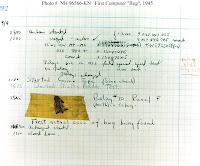 ms, an investigation showed that there was a moth trapped between the points of Relay #70, in Panel F. The operators removed the moth and affixed it to the log. (See the picture above.) The entry reads: "First actual case of bug being found." The word went out that they had "debugged" the machine and the term "debugging a computer program" was born.
Although Grace Hopper was always careful to admit that she was not there when it actually happened, it was one of her favorite stories. Grace Hopper also reported that the term "bug" was used to describe problems in radar electronics during WWII.
DIAGRAM OF FIRST NOTED COMPUTER BUG LOCATED ABOVE.
 ms, an investigation showed that there was a moth trapped between the points of Relay #70, in Panel F. The operators removed the moth and affixed it to the log. (See the picture above.) The entry reads: "First actual case of bug being found." The word went out that they had "debugged" the machine and the term "debugging a computer program" was born.
Although Grace Hopper was always careful to admit that she was not there when it actually happened, it was one of her favorite stories. Grace Hopper also reported that the term "bug" was used to describe problems in radar electronics during WWII.
DIAGRAM OF FIRST NOTED COMPUTER BUG LOCATED ABOVE.
Wikipedia Entry: http://en.wikipedia.org/wiki/Software_bug
Tuesday, September 15, 2009
Change in Trends due to Technology
Change in Trends due to Technology
* The first computers were almost the size of a house.. .now they are as small as a notepad!
* The wrist watch is now replaced by a Cell Phone or Computer
* The US Postal Mail is almost replaced completely by Email. (Who sends letters anymore?)
* Instead of waiting for the newspaper to be delivered once a week (how slow~)... we can now
check the news in real time via the internet and RSS Feeds.
* The Public Library and Card Catalog were practically replaced by Google, Yahoo, and other
Search Engines.
* Cash Registers and Tenders in our shopping centers have been replaced by electronic express
lanes where we can check out all by ourselves.
* We can order products directly from the comfort of our own home and have them delivered
directly to our door without ever having to go to a store, stand in line, or touch germy money!
* The telephone system is slowly being replaced by online telephones such as Vonage, or
Magicjack. Yahoo Messenger can allow you to communicate visually and audibly with family
in other states for free.
* You can now watch cable tv episodes if you miss them by going to www.hulu.com.
* We can rent DVD's directly from www.netflix.com and stream them over the internet within
minutes of ordering the movie!
* Instead of buying an entire music cd from a store like Walmart or BestBuy for $20.. you can
now buy an individual song directly from ITunes on the internet for $1 each!
* We can even order pet medicine such as Frontline and Rabies Shots online at vendors like
www.petsmart.com.
* Our radios, music players and cameras and alarm clocks are now all included in our cellphones
or "Smartphones".
* Robots are taking peoples jobs in factorys and on assembly lines.
* Our body parts can even be recreated by electronic parts now~!
Technology has advanced so much in the past 20 years. I am sure that I only covered a small portion of how technology has changed our lives. Can you imagine what it will be like in the next 20 years?
TELL US:
If you think of more ways that electronics have changed our lives please tell us at www.cgrafiks.com.
* The first computers were almost the size of a house.. .now they are as small as a notepad!
* The wrist watch is now replaced by a Cell Phone or Computer
* The US Postal Mail is almost replaced completely by Email. (Who sends letters anymore?)
* Instead of waiting for the newspaper to be delivered once a week (how slow~)... we can now
check the news in real time via the internet and RSS Feeds.
* The Public Library and Card Catalog were practically replaced by Google, Yahoo, and other
Search Engines.
* Cash Registers and Tenders in our shopping centers have been replaced by electronic express
lanes where we can check out all by ourselves.
* We can order products directly from the comfort of our own home and have them delivered
directly to our door without ever having to go to a store, stand in line, or touch germy money!
* The telephone system is slowly being replaced by online telephones such as Vonage, or
Magicjack. Yahoo Messenger can allow you to communicate visually and audibly with family
in other states for free.
* You can now watch cable tv episodes if you miss them by going to www.hulu.com.
* We can rent DVD's directly from www.netflix.com and stream them over the internet within
minutes of ordering the movie!
* Instead of buying an entire music cd from a store like Walmart or BestBuy for $20.. you can
now buy an individual song directly from ITunes on the internet for $1 each!
* We can even order pet medicine such as Frontline and Rabies Shots online at vendors like
www.petsmart.com.
* Our radios, music players and cameras and alarm clocks are now all included in our cellphones
or "Smartphones".
* Robots are taking peoples jobs in factorys and on assembly lines.
* Our body parts can even be recreated by electronic parts now~!
Technology has advanced so much in the past 20 years. I am sure that I only covered a small portion of how technology has changed our lives. Can you imagine what it will be like in the next 20 years?
TELL US:
If you think of more ways that electronics have changed our lives please tell us at www.cgrafiks.com.
Thursday, September 3, 2009
Gmail went down ... Everyone Panic!
I guess that Gmail went down sometime the other day, and it caused the world to go into panic. It was down for 100 minutes according to many sites. Reference the OFFICIAL GOOGLE BLOG for more information. According to google this is what happened in summary:
Google took a small fraction of Gmail's servers offline to perform routine upgrades. They say that they do this all the time, and Gmail's web interface runs in many
locations and just sends traffic to other locations when one is offline. However, in this case they had slightly underestimated the load placed on the request routers — servers which direct web queries to the
appropriate Gmail server for response. At about 12:30 pm Pacific a few of the
request routers became overloaded and in effect told the rest of the system
"stop sending us traffic, we're too slow!". This transferred the load onto the
remaining request routers, causing a few more of them to also become overloaded,
and within minutes nearly all of the request routers were overloaded. As a
result, people couldn't access Gmail via the web interface because their
requests couldn't be routed to a Gmail server. IMAP/POP access and mail
processing continued to work normally because these requests don't use the same
routers.The Gmail engineering team was alerted to the failures within seconds
(we take monitoring very seriously). After establishing that the core problem
was insufficient available capacity, the team brought a LOT of additional
request routers online (flexible capacity is one of the advantages of Google's
architecture), distributed the traffic across the request routers, and the Gmail
web interface came back online.What's next: We've turned our full attention to
helping ensure this kind of event doesn't happen again. Some of the actions are
straightforward and are already done — for example, increasing request router
capacity well beyond peak demand to provide headroom. Some of the actions are
more subtle — for example, we have concluded that request routers don't have
sufficient failure isolation (i.e. if there's a problem in one datacenter, it
shouldn't affect servers in another datacenter) and do not degrade gracefully
(e.g. if many request routers are overloaded simultaneously, they all should
just get slower instead of refusing to accept traffic and shifting their load).
We'll be hard at work over the next few weeks implementing these and other Gmail
reliability improvements — Gmail remains more than 99.9% available to all users,
and we're committed to keeping events like today's notable for their rarity
Sunday, August 30, 2009
Cell Phone Towers VS Wireless Internet
Cell Phone Towers Vs. Wireless Internet:
I have a client that I was wanting to make wireless. His mom lives next door (50 feet away) and she has High Speed DSL. He has Dial-Up Internet at his house which is technically the same as his moms house. He had them built side by side and wired as one complete house when it was originally built. She has half of it with her own kitchen, bathroom, laundry room, and bedrooms, and he has the other half with all the same ammenities.
When first approched with this scenario, I thought it would be a piece of cake. His moms modem was located directly by a window which pointed to his house.... 50 feet away. No concrete walls, or even flourescent lighting to make any Electromagnetic Interference (EMI). This should be no problem!
I gathered up the information I needed for the quote. Purchased a Linksys Wireless N Router, and a DLink Wireless N Desktop PCI card. Scheduled a time to go out and hook it all up. When I arrived it was an easy configuration to get the wireless router working. The installation of the PCI Desktop card hung up a little while trying to install the total software package, so I stopped it and restored back to before I tried installing it... then only installed the driver and let the Windows Wireless Configuration utility take control from there. .... No Signal Detected!
Sadly I had forgotten to grab my laptop, so I unhooked his desktop system and took it to the laundry room which was the closest point to her router from within his house... only got 1 Bar! After a little bit of research I found that he had a huge Cell Phone tower only about 300 foot away from his house. I could almost throw a stone and hit it!
Well, I know that most cordless phones work on the 2.4Ghz frequency, and it just so happens that almost every router also works on that frequency. So I went to Staples and bought a Dual Band Wireless N Router from Netgear. This router allowed me to choose the frequency that it broadcasted on from a 2.4Ghz range up to the 5GHz range. So I configured it correctly.. set it up on the 5.1Ghz range, and then tried it again... only 2 bars now! Slight improvement, but still not enough. I was getting 2 bars from the laundry room... but still no signal back in his office!
I went back to staples and saw another device called the Netgear Powerline. This plugs up to an electric outlet by your router, and then run a cable from the router to this little PowerLine box, and then you go to an outlet by the other computer and connect another Powerline box to the desktop computer. This transfers the ethernet power over the electric lines and is supposed to work up to a 5000 sq ft home as long as the electric is all on one meter. I called the client, and luckily he had wired his house and his moms house together when he built it. I grabbed this and a Linksys Wireless G Range Extender. They did not have a Wireless N Range Extender yet, so this would cause me to go back down to a 2.4ghz range and a Wireless G speed. This was a last resort. I hoped that the powerline would work instead.
Drove back to the clients house (30 minute trip from staples) and tried the power line first. It worked great ... in the living room.. but not in his office. Both homes are only about 4,000 sq ft total... it should have worked!
I had to resort to putting the first router back in (Wireless N but a 2.4Ghz frequency) and the Wireless G Range Extender, to make it extend to his office. He still only got 3 bars with the extender, but it kept a constant connection to google at 25ms response time. We shut every door in his house and it still kept a good connection. At least the problem was solved, but it took several hours, and about $300 of experimenting with parts before we found the right solution.
This was a learning experience to say the least. I now know to check the surrounding areas for a cell phone tower when working with Wireless networks. I also learned about the cool device called the Netgear Powerline. Hope this helps someone!
I have a client that I was wanting to make wireless. His mom lives next door (50 feet away) and she has High Speed DSL. He has Dial-Up Internet at his house which is technically the same as his moms house. He had them built side by side and wired as one complete house when it was originally built. She has half of it with her own kitchen, bathroom, laundry room, and bedrooms, and he has the other half with all the same ammenities.
When first approched with this scenario, I thought it would be a piece of cake. His moms modem was located directly by a window which pointed to his house.... 50 feet away. No concrete walls, or even flourescent lighting to make any Electromagnetic Interference (EMI). This should be no problem!
I gathered up the information I needed for the quote. Purchased a Linksys Wireless N Router, and a DLink Wireless N Desktop PCI card. Scheduled a time to go out and hook it all up. When I arrived it was an easy configuration to get the wireless router working. The installation of the PCI Desktop card hung up a little while trying to install the total software package, so I stopped it and restored back to before I tried installing it... then only installed the driver and let the Windows Wireless Configuration utility take control from there. .... No Signal Detected!
Sadly I had forgotten to grab my laptop, so I unhooked his desktop system and took it to the laundry room which was the closest point to her router from within his house... only got 1 Bar! After a little bit of research I found that he had a huge Cell Phone tower only about 300 foot away from his house. I could almost throw a stone and hit it!
Well, I know that most cordless phones work on the 2.4Ghz frequency, and it just so happens that almost every router also works on that frequency. So I went to Staples and bought a Dual Band Wireless N Router from Netgear. This router allowed me to choose the frequency that it broadcasted on from a 2.4Ghz range up to the 5GHz range. So I configured it correctly.. set it up on the 5.1Ghz range, and then tried it again... only 2 bars now! Slight improvement, but still not enough. I was getting 2 bars from the laundry room... but still no signal back in his office!
I went back to staples and saw another device called the Netgear Powerline. This plugs up to an electric outlet by your router, and then run a cable from the router to this little PowerLine box, and then you go to an outlet by the other computer and connect another Powerline box to the desktop computer. This transfers the ethernet power over the electric lines and is supposed to work up to a 5000 sq ft home as long as the electric is all on one meter. I called the client, and luckily he had wired his house and his moms house together when he built it. I grabbed this and a Linksys Wireless G Range Extender. They did not have a Wireless N Range Extender yet, so this would cause me to go back down to a 2.4ghz range and a Wireless G speed. This was a last resort. I hoped that the powerline would work instead.
Drove back to the clients house (30 minute trip from staples) and tried the power line first. It worked great ... in the living room.. but not in his office. Both homes are only about 4,000 sq ft total... it should have worked!
I had to resort to putting the first router back in (Wireless N but a 2.4Ghz frequency) and the Wireless G Range Extender, to make it extend to his office. He still only got 3 bars with the extender, but it kept a constant connection to google at 25ms response time. We shut every door in his house and it still kept a good connection. At least the problem was solved, but it took several hours, and about $300 of experimenting with parts before we found the right solution.
This was a learning experience to say the least. I now know to check the surrounding areas for a cell phone tower when working with Wireless networks. I also learned about the cool device called the Netgear Powerline. Hope this helps someone!
Wednesday, August 26, 2009
Fake Antivirus Programs


PROTECT YOURSELF FROM FAKE ANTIVIRUS PROGRAMS:
We have had at least 2 of these a week come in to the shop. Fake Antivirus Programs such as Personal Antivirus, Antivirus PRO 2009, Antispyware 2009, + Many More. They are all about the same in the fact that they give you alot of popups saying that you have tons of virus infections and then BUY NOW to remove them! This is a scam! Do Not Buy These Programs~! These programs are the "Actual Virus". You do not have as many infected files as it says.
Yes it is important to have your system looked at by a professional. Do Not leave these programs on your computer in hopes that they will just go away, or hoping that you can just wait a little longer before getting it fixed.... These fake antivirus programs are wanting to steal your Credit/Debit card information and possibly hit you with Identity Theft!
They are not real antivirus programs. You are not really infected with 50 trojans, and DO NOT CLICK ON ANYTHING or GIVE IT ANY CREDIT CARD OR PERSONAL INFORMATION. Do Not Buy the program to remove the viruses that it tells you that you have! In fact do not even click the “OK” button, or the “CLOSE” button. Press CTRL+ALT+DELETE and End the IExplorer process or application directly, and then contact us.
Most of these Fake Antivirus "Viruses" seem to be coming from Myspace, and other social websites such as MyYearbook, and Facebook. The most common reason is due to the "code" of these social websites. Many of you may have unintentially embedded virus code in to your Myspace layout by simply "copy" and "pasting" other Myspace code which allows you to change your Myspace backgrounds, add special effects such as hearts falling from the top of the page, or other "cool" themes. When other Myspace users visit your webpage they can become infected with these fake antivirus programs, or other malware; simply by viewing your page!
HOW DO I KNOW IF I HAVE A FAKE ANTIVIRUS?
* Fake anti-virus/spyware programs often generate more "alerts" than the software made by reputable companies.
* You may be swarmed with pop-ups, even when you're not online!
* These programs are very persisitent in making you BUY IT NOW!
* Normally your computer will dramatically slow down.
* Other signs of infection include:
new desktop icons; new wallpaper, or having your homepage redirected to another site.
Fake Anti Virus Prevention Tips
1. Use Firefox as your browser rather than Internet Explorer.
2. Keep your computer updated with the latest anti-virus and anti-spyware software, and be sure to use a good firewall. We recommend Norton 2009 as a Paid Antivirus, or AVG Free as a Free Antivirus. Also use SuperAntiSpyware or Malwarebytes for Free.
3. Never open an email attachment unless you are POSITIVE about the source. Actually call your friends and ask if they really sent that message about "The Party they saw you at"... rather than just opening it to see.
4. Do NOT click on any pop-up that advertises anti-virus or anti-spyware software, especially a program promising to provide every feature known to mankind. (Also remember: the fakes often mimic well-known brands such as Grisoft AVG, Norton)
5. If a virus alert appears on your screen, do NOT touch it. Don't use your mouse to eliminate or scan for viruses, and DON'T use your mouse to close the window. Instead, hit control + alt + delete to view a list of programs currently running. Delete the "rogue" from the list of running programs, and call your local computer repair center such as CGrafiks 931-335-0398!
6. Do not download freeware or shareware unless you know it's from a reputable source. Unfortunately, freeware and shareware programs often come bundled with spyware, adware or fake anti-virus programs.
7. Avoid questionable websites. Some sites may automatically download malicious software onto your computer.
8. Reset your current security settings to a higher level.
9. Although fake software may closely resemble the real thing, it's rarely an exact match. Look for suspicious discrepancies.
10. Check out this list of rogue/fake anti-virus and anti-spyware products.
http://www.spywarewarrior.com/rogue_anti-spyware.htm
If your computer is infected by a fake antivirus, immediately stop work, shut down, and unplug your ethernet connection from the computer. Then contact your computer manufacturer's tech-support hotline or CGrafiks Computer Service Center. Don't keep using the computer. This may further damage your machine and provide identity thieves with more information about you.
Use of fake anti-virus, anti-spyware software is a fast-growing scam, especially as more people become aware of the dangers of spyware, adware and malware. By following the tips above, however, you'll better protect yourself from becoming the next victim of scammers, identity thieves and hackers.
REFERENCED FROM: http://www.scambusters.org/fakeantivirus.html
Friday, July 24, 2009
Is my Processor (CPU) Overheating?
What temperature should my processor be running at?
Depending on the type of processor, the manufacturer, how fast it runs, where the sensor is located, and what programs it is currently running will determine the temperature of what the processor should be. However, this document should give you a general idea of what the processor should be running at as well as what is acceptable and what is not.
The majority of today's desktop processors should not exceed temperatures of 95C and most will run between 70-90C. Below are some charts of many of the processors and their average temperatures. Keep in mind this is only to give our users a general idea of what their processor should be running at. If you believe your computer is running to hot, you may wish to skip to the bottom of this document for additional details on how to get exact information about what your processor should be running at.
Processors Average temperature:
AMD Athlon 90C - 95C
AMD Athlon64 65C - 70C
AMD Athlon64 Mobile 95C - 100C
AMD Athlon MP 90C - 95C
AMD Athlon XP 85C - 90C
AMD Duron 85C - 95C
AMD Opteron 65C - 71C
AMD Sempron 90C - 95C
AMD K5 60C - 70C
AMD K6 65C - 70C
AMD K6 Mobile 80C - 85C
AMD K7 Thunderbird 70C - 95C
Intel Pentium II 65C - 75C
Intel Pentium III 60C - 85C
Intel Celeron 67C - 85C
Intel Pentium Mobile 100C
Intel Pentium Pro 80C - 85C
Reference from: http://www.computerhope.com/issues/ch000687.htm
Depending on the type of processor, the manufacturer, how fast it runs, where the sensor is located, and what programs it is currently running will determine the temperature of what the processor should be. However, this document should give you a general idea of what the processor should be running at as well as what is acceptable and what is not.
The majority of today's desktop processors should not exceed temperatures of 95C and most will run between 70-90C. Below are some charts of many of the processors and their average temperatures. Keep in mind this is only to give our users a general idea of what their processor should be running at. If you believe your computer is running to hot, you may wish to skip to the bottom of this document for additional details on how to get exact information about what your processor should be running at.
Processors Average temperature:
AMD Athlon 90C - 95C
AMD Athlon64 65C - 70C
AMD Athlon64 Mobile 95C - 100C
AMD Athlon MP 90C - 95C
AMD Athlon XP 85C - 90C
AMD Duron 85C - 95C
AMD Opteron 65C - 71C
AMD Sempron 90C - 95C
AMD K5 60C - 70C
AMD K6 65C - 70C
AMD K6 Mobile 80C - 85C
AMD K7 Thunderbird 70C - 95C
Intel Pentium II 65C - 75C
Intel Pentium III 60C - 85C
Intel Celeron 67C - 85C
Intel Pentium Mobile 100C
Intel Pentium Pro 80C - 85C
Reference from: http://www.computerhope.com/issues/ch000687.htm
Tuesday, July 21, 2009
CD or DVD Media Typical Lifespan
The Typical Lifespan of a CD is 3 years!
The Typical Lifespan of a DVD is ...
With proper care it is thought that CD-Rs should be readable one thousand times or more and have a shelf life of three to five years. Common handling practices can reduce shelf life to only one or two years. This seems to be the standard for DVD's also; however there are many variables that can come in to play...
When cleaning a CD: Dust can be removed from a CD's surface using compressed air or by very lightly wiping the information side with a very soft cloth (such as an eyeglass cleaning cloth) from the center of the disc in an outward direction. Fingerprints or stubborn dust can be removed from the information surface by wiping it with a cloth dampened with diluted dish detergent (then rinsing) or alcohol (methylated spirits or isopropyl alcohol) and again wiping from the center outwards, with a very soft cloth (non-linting : polyester, nylon, etc.). It is harmful, however, to use acetone, nail polish remover, kerosene, petrol/gasoline, or any other type of petroleum-based solvent to clean a CD-R; the use of petroleum based solvents will damage the polycarbonate surface and the CD-R will become unreadable.
MAM-A estimates their Gold label CD-R's have a life-span of 300 years and the silver CD-R's of about 50 years. Other discs that they have tested look like they'll fail in 2 years or less.
Due to differences in organic dyes between CDs and DVD's, Gold label DVD's have a lab-rated life-span of 100 years, if handled properly. MAM-A silver label CDs and DVD's can start to degrade after 20-30 years.
MAM-A also recommends to improve data integrity and compatibility, burn your disks more slowly. Burn CDs at 16x speed and DVD's at 2x speed.
The Real Culprit
If you have purchased quality media from a quality manufacturer, you are still not assured of 50-100 years of data life!
You are the greatest danger to the data longevity of your personal, family and business information that is stored on CD and DVD. Direct exposure to sunlight and intense heat can do dramatic damage. Rapid changes in temperature and humidity can stress the materials. Gravity can bend and stress the discs. Fingerprints and smudges can do more damage than scratches.
But by following a few Do's and Don'ts you can ensure your precious family and friend pictures, movies, family records and business files have the maximum data life.
Do
* Handle discs by the outer edge or the center hole
* Use a non solvent-based felt-tip permanent marker to mark the label side of the disc
* Keep dirt or other foreign matter from the disc
* Store discs upright (book style) in original jewel cases that are specified for CDs and DVDs
* Return discs to their jewel cases immediately after use
* Leave discs in their spindle or jewel case to minimize the effects of environmental changes
* Remove the shrink wrap only when you are ready to record data on the disc
* Store in a cool, dry, dark environment in which the air is clean -- relative humidity should be in the range 20% - 50% (RH) and temperature should be in the range 4°C - 20°C
* Remove dirt, foreign material, fingerprints, smudges, and liquids by wiping with a clean cotton fabric in a straight line from the center of the disc toward the outer edge
* Use deionized (best), distilled or soft tap water to clean your discs. For tough problems use diluted dish detergent or rubbing alcohol. Rinse and dry thoroughly with a lint-free cloth or photo lens tissue
* Check the disc surface before recording
Do not
* Touch the surface of the disc
* Bend the disc
* Store discs horizontally for a long time (years)
* Open a recordable optical disc package if you are not ready to record
* Expose discs to extreme heat or high humidity
* Expose discs to extreme rapid temperature or humidity changes
* Expose recordable discs to prolonged sunlight or other sources of UV light
* Write or mark in the data area of the disc (area where the laser "reads")
* Clean in a circular direction around the disc.
* Reliable Medium There is a lot of cheap CDR and DVDR media that has marginal quality. For some applications like games, quality isn't critical. For irreplaceable, vital data like family photos, special events, vacations and family/friends memories quality does matter. If you are backing up mission critical data on your home or business computer, quality matters. Then it is important to select a brand of media that will keep your data safe, secure and available for years to come.
Quality and low prices just don't seem to mix!
The next step to long-term data reliability is to handle and store the media with the respect your data deserves.
RESOURCES:
http://www.audioholics.com/education/audio-formats-technology/cd-and-dvd-longevity-how-long-will-they-last
http://www.computerworld.com/s/article/107607/Storage_expert_warns_of_short_life_span_for_burned_CDs
Wikipedia: http://en.wikipedia.org/wiki/CD-R#Expected_lifespan
http://www.larryjordan.biz/articles/lj_dvd_life.html
http://wiki.answers.com/Q/What_is_the_lifespan_of_a_DVD
The Typical Lifespan of a DVD is ...
With proper care it is thought that CD-Rs should be readable one thousand times or more and have a shelf life of three to five years. Common handling practices can reduce shelf life to only one or two years. This seems to be the standard for DVD's also; however there are many variables that can come in to play...
When cleaning a CD: Dust can be removed from a CD's surface using compressed air or by very lightly wiping the information side with a very soft cloth (such as an eyeglass cleaning cloth) from the center of the disc in an outward direction. Fingerprints or stubborn dust can be removed from the information surface by wiping it with a cloth dampened with diluted dish detergent (then rinsing) or alcohol (methylated spirits or isopropyl alcohol) and again wiping from the center outwards, with a very soft cloth (non-linting : polyester, nylon, etc.). It is harmful, however, to use acetone, nail polish remover, kerosene, petrol/gasoline, or any other type of petroleum-based solvent to clean a CD-R; the use of petroleum based solvents will damage the polycarbonate surface and the CD-R will become unreadable.
MAM-A estimates their Gold label CD-R's have a life-span of 300 years and the silver CD-R's of about 50 years. Other discs that they have tested look like they'll fail in 2 years or less.
Due to differences in organic dyes between CDs and DVD's, Gold label DVD's have a lab-rated life-span of 100 years, if handled properly. MAM-A silver label CDs and DVD's can start to degrade after 20-30 years.
MAM-A also recommends to improve data integrity and compatibility, burn your disks more slowly. Burn CDs at 16x speed and DVD's at 2x speed.
The Real Culprit
If you have purchased quality media from a quality manufacturer, you are still not assured of 50-100 years of data life!
You are the greatest danger to the data longevity of your personal, family and business information that is stored on CD and DVD. Direct exposure to sunlight and intense heat can do dramatic damage. Rapid changes in temperature and humidity can stress the materials. Gravity can bend and stress the discs. Fingerprints and smudges can do more damage than scratches.
But by following a few Do's and Don'ts you can ensure your precious family and friend pictures, movies, family records and business files have the maximum data life.
Do
* Handle discs by the outer edge or the center hole
* Use a non solvent-based felt-tip permanent marker to mark the label side of the disc
* Keep dirt or other foreign matter from the disc
* Store discs upright (book style) in original jewel cases that are specified for CDs and DVDs
* Return discs to their jewel cases immediately after use
* Leave discs in their spindle or jewel case to minimize the effects of environmental changes
* Remove the shrink wrap only when you are ready to record data on the disc
* Store in a cool, dry, dark environment in which the air is clean -- relative humidity should be in the range 20% - 50% (RH) and temperature should be in the range 4°C - 20°C
* Remove dirt, foreign material, fingerprints, smudges, and liquids by wiping with a clean cotton fabric in a straight line from the center of the disc toward the outer edge
* Use deionized (best), distilled or soft tap water to clean your discs. For tough problems use diluted dish detergent or rubbing alcohol. Rinse and dry thoroughly with a lint-free cloth or photo lens tissue
* Check the disc surface before recording
Do not
* Touch the surface of the disc
* Bend the disc
* Store discs horizontally for a long time (years)
* Open a recordable optical disc package if you are not ready to record
* Expose discs to extreme heat or high humidity
* Expose discs to extreme rapid temperature or humidity changes
* Expose recordable discs to prolonged sunlight or other sources of UV light
* Write or mark in the data area of the disc (area where the laser "reads")
* Clean in a circular direction around the disc.
* Reliable Medium There is a lot of cheap CDR and DVDR media that has marginal quality. For some applications like games, quality isn't critical. For irreplaceable, vital data like family photos, special events, vacations and family/friends memories quality does matter. If you are backing up mission critical data on your home or business computer, quality matters. Then it is important to select a brand of media that will keep your data safe, secure and available for years to come.
Quality and low prices just don't seem to mix!
The next step to long-term data reliability is to handle and store the media with the respect your data deserves.
RESOURCES:
http://www.audioholics.com/education/audio-formats-technology/cd-and-dvd-longevity-how-long-will-they-last
http://www.computerworld.com/s/article/107607/Storage_expert_warns_of_short_life_span_for_burned_CDs
Wikipedia: http://en.wikipedia.org/wiki/CD-R#Expected_lifespan
http://www.larryjordan.biz/articles/lj_dvd_life.html
http://wiki.answers.com/Q/What_is_the_lifespan_of_a_DVD
Thursday, July 9, 2009
Dell Optiplex GX280 wont work with case closed
Ok. Had a weird issue today. I had to work on a system that would not power on at first, so I replaced the power supply, and then did some internal cleaning. Tested all the hardware with my diagnostic tools... all was ok. I even started up into the O.S. just to check the operating system and make sure it was up to date and had an antivirus. After everything was done, I shut it down, closed the cover and turned it back on just to verify everything was ok. .....
It did not show the Dell logo and just had the BIOS version at the top left corner of the screen, and the monitor kept flickering / degaussing kind of.
I opened the case up and powered it on without any problem! Closed the case,... same thing. Opened it back up and was looking carefully in the computer for anything that would be shorting out... but it only happened when the case was closed. Bypassed the case switch that tells if the chasis has been opened or not. Took everything off the motherboard except bare bone equipment, and it did the same thing. Used a power supply tester to test the voltages on everything when the case was closed... everything tested ok. I had the same exact model to test with, so the next step was to put this motherboard in a working computer case, and vice versa...
Well After that they both worked!
Long story short, it ended up being that the power supply cable was laying on the memory chips when the case was closed. The power cables were heavy and caused strain on the motherboard which caused the video problems and the computer not to POST. Once the power cables were strapped to the side and out of the way ... everything worked.
It did not show the Dell logo and just had the BIOS version at the top left corner of the screen, and the monitor kept flickering / degaussing kind of.
I opened the case up and powered it on without any problem! Closed the case,... same thing. Opened it back up and was looking carefully in the computer for anything that would be shorting out... but it only happened when the case was closed. Bypassed the case switch that tells if the chasis has been opened or not. Took everything off the motherboard except bare bone equipment, and it did the same thing. Used a power supply tester to test the voltages on everything when the case was closed... everything tested ok. I had the same exact model to test with, so the next step was to put this motherboard in a working computer case, and vice versa...
Well After that they both worked!
Long story short, it ended up being that the power supply cable was laying on the memory chips when the case was closed. The power cables were heavy and caused strain on the motherboard which caused the video problems and the computer not to POST. Once the power cables were strapped to the side and out of the way ... everything worked.
Monday, June 8, 2009
Virus Report June 2009
Virus Report June 5 2009
AntivirusDoktor is designed to make users believe their computer is infected. This tool performs a false scan of the infected system. AntivirusDoktor then offers users the option to eliminate the malware by purchasing a paid version of the fake antivirus software.
Sinowal.WHZ is a trojan distributed via email that reports to have come from UPS. The email informs the user that the UPS servicde was unable to deliver the packet sent to a recipient on a specific date. Once the user opens the attached file, a trojan is copied in to their computer that steals the infected users bank details!
Another attack has been formed on twitter.com. Twitter is being used to distribute fake antiviruses such as AntivirusDoktor.
AntivirusDoktor is designed to make users believe their computer is infected. This tool performs a false scan of the infected system. AntivirusDoktor then offers users the option to eliminate the malware by purchasing a paid version of the fake antivirus software.
Sinowal.WHZ is a trojan distributed via email that reports to have come from UPS. The email informs the user that the UPS servicde was unable to deliver the packet sent to a recipient on a specific date. Once the user opens the attached file, a trojan is copied in to their computer that steals the infected users bank details!
Another attack has been formed on twitter.com. Twitter is being used to distribute fake antiviruses such as AntivirusDoktor.
Thursday, May 28, 2009
Remote Assistance
WHAT IS REMOTE ASSISTANCE?
NORMAL RATES: $35 per Hour ($8.75 per 15 minutes)
15 minute Minimum Charge on all connections.
AFTER HOUR RATES: $60 per Hour after 8pm / On Weekends / Holidays!
If your Internet Connection is WORKING and you need a Technician to do software troubleshooting on your Windows based PC - Without needing any physical labor done on the computer..... then we can use Remote Assistance via Internet to help you without you having to pay a Service Call fee for a Tech to come to your home.
Often we can fix your computer problem over the telephone. Maybe you just need help updating your antivirus software, or fixing an uncompatable addon. We consider that a completed job, and also charge for a Remote Assistance session. The cost is only $25 per hour and your only charged from the time the Technician actually makes a connection to your computer via the internet, or for the length of the phone call. We will even give you the instructions below so that you can prepare everything for the Technican - Saving you even more money! Simply, follow the Instructions below and call CGrafiks when your done.
During your remote repair session YOU will be able to observe all repairs LIVE by watching your screen while we solve your problem. Your computer mouse will actually move around on your computer screen right before your eyes. You can even watch and learn! Plus, YOU will be able to assume control at any time. When we are finished, we will disconnect from your computer and will be unable to reconnect, unless YOU initiate the connection again. This entire process keeps you, our client in complete control at all times. We're happy to explain this process over the phone to clarify any concerns that you may still have
TO BEGIN A REMOTE ASSISTANCE SESSION: Visit Www.CGrafiks.Com
NORMAL RATES: $35 per Hour ($8.75 per 15 minutes)
15 minute Minimum Charge on all connections.
AFTER HOUR RATES: $60 per Hour after 8pm / On Weekends / Holidays!
If your Internet Connection is WORKING and you need a Technician to do software troubleshooting on your Windows based PC - Without needing any physical labor done on the computer..... then we can use Remote Assistance via Internet to help you without you having to pay a Service Call fee for a Tech to come to your home.
Often we can fix your computer problem over the telephone. Maybe you just need help updating your antivirus software, or fixing an uncompatable addon. We consider that a completed job, and also charge for a Remote Assistance session. The cost is only $25 per hour and your only charged from the time the Technician actually makes a connection to your computer via the internet, or for the length of the phone call. We will even give you the instructions below so that you can prepare everything for the Technican - Saving you even more money! Simply, follow the Instructions below and call CGrafiks when your done.
During your remote repair session YOU will be able to observe all repairs LIVE by watching your screen while we solve your problem. Your computer mouse will actually move around on your computer screen right before your eyes. You can even watch and learn! Plus, YOU will be able to assume control at any time. When we are finished, we will disconnect from your computer and will be unable to reconnect, unless YOU initiate the connection again. This entire process keeps you, our client in complete control at all times. We're happy to explain this process over the phone to clarify any concerns that you may still have
TO BEGIN A REMOTE ASSISTANCE SESSION: Visit Www.CGrafiks.Com
Subscribe to:
Posts (Atom)

 Posts
Posts


