DCOM errors related to HP Printers on the network. This is a result of having shared printers on the server that are no longer really on the server. For instance a shared HP Laserjet 1200 when there is no longer a laserjet 1200 model because you've updated to a 1400 model now.
OTHER OPTIONS: Start / RUN / dcomcnfg.exe (To View Info)
Open registry using REGEDIT 2. Open the HKEY_CLASSES_ROOT branch 3. Search for the hex number {5A5AA0AA-1DEB-4683-96B0-B43301E83971} 4. When you get a match the folder name will give you a clue as to what program is causing this errror. 5. Go onto the vendor webiste and look for fixes
REMOVE PRINTERS FROM REGISTRY:
There is a problem with NT printer definitions that may cause you problems. You follow standard advice to uninstall and reinstall the printer driver. Sometimes this doesn't fix the problem and you have no choice but to remove a printer. When you use the Remove or Delete Printer options in Print Manager, the printer connection disappears immediately. However, the spooler simply marks the printer for deletion. NT doesn't actually delete the printer until you reboot the system. Sometimes NT will delete the definition if you stop and restart the spooler. Sometimes it doesn't. If this doesn't work, and you will find out when you try to redefine the printer. No issue for workstations. You can reboot. Unfortunately there are servers which can not be rebooted (or at least not for something like a printer definition). For servers which can not be rebooted, you can remove the printer definition from the registry by hand prior to the reinstall.
If it is a local printer (My Computer), go to the following registry keys and delete the respective entries:
HKEY_LOCAL_MACHINE\SYSTEM\CurrentControlSet\Control\Print\Environments\ Windows NT x86\ Drivers\Version-2\
HKEY_LOCAL_MACHINE\SYSTEM\CurrentControlSet\Control\Print\Printers\
If it is a network printer (network printer server or \\), go to the following registry keys and delete the respective and entries:
HKEY_CURRENT_USER\Printers\Connections\
HKEY_LOCAL_MACHINE\SYSTEM\CurrentControlSet\Control\Print\Providers\ LanMan Print Services\Servers\\Printers\
After the registry edit, you need to stop and restart the spooler service. At this point, you'll be able to reinstall the printer driver correctly.
Monday, October 5, 2009


Saturday, October 3, 2009
CGrafiks Website Flagged by Norton as Unsafe

Just a Minor Disagreement... Don't Worry! We're not getting a Divorce.
As many of you know we recommend Norton 2009 as a "Paid" Antivirus at the CGrafiks office. Recently ( I believe 3 days ago now ) the http://www.cgrafiks.com/ website was flagged by the Norton Internet Protection showing that it had several malicious programs on it and that it was unsafe to go to.
The Reason Is:
We have a section of our website that we use to hold software that we may need when at someones house working on their computer. Instead of us having to hunt for a program and waste your time (especially on dial-up), we can go straight to a webpage that has our tools handy. Some of the tools that are on this webpage are used for removing viruses, or scanning networks for intruders. These helpfull programs use the same algorithms as many of todays malicious software inorder to find the bad guys, and therefore get flagged by many virus programs. For instance if you run more than one malware removal program on your computer you see this happen. Your antivirus (AVG for example) may detect your spyware program (Spybot) as a malicious program. Or your Spyware program (Spybot) will detect your Adware program (AdAware) as a malicious program.
Www.CGrafiks.Com does not contain any viruses to our knowledge. If you ever do get an attack on your system while browsing the CGrafiks website please note the time and date and take a screen shot of the warning by pressing the PRINT / SCREEN button on your computer keyboard, then open Microsoft Paint found under START MENU / PROGRAMS / ACCESSORIES.. and PASTE it into paint by clicking EDIT / PASTE or (CTRL+V) in the top menu. Finally save the file to your desktop or somewhere safe by pressing FILE / SAVE or (CTRL+S). Send that picture to CGrafiks at the email found on our contact page at Www.CGrafiks.Com or contact us via our many affiliates such as MerchantCircle, GoLSN, etc.
Norton has been notified about the problem, and it will be resolved soon. Thank you for your patience and understanding, and if you have any further questions please contact us at 931-335-0398.
CGrafiks Management
October 3 2009
Saturday, September 26, 2009
Theres a BUG in my Computer!
.JPG) There's A Bug In My Computer!
There's A Bug In My Computer!I had a computer come in to the shop just the other day that first off would not power on. It had a bad Power Supply Unit. Then after replacing the PS it was giving a beep error. It wasn't the standard memory beep error, so I went straight to the processor. I took the heat sink off only to find 3 dead roaches attached to the heatsink and processor. There were also 6 live roaches huddled around the CPU, and they began to scatter when I took the heatsink off. I wanted to take a picture of it for proof, but I also didn't want to leave the site of the computer and risk an infection of my shop. I panicked a little, but the first thing I could think to do was throw everything in a garbage bag, tape it up, and set it outside. I have never had to deal with bugs before. I always knew there was a possibiligy of having a real "bug" in your computer system, but as of the 3 years I've been in business , I had never seen this situation. I called some tech friends and they all said to just have the client come get their infected machine, but I didn't feel like that was the right answer.
So wha
 t I did was took the system outside on my table, and attached a garbage bag to the backside of the system case. I then used my high powered leaf blower to blow out the roaches that I could into the garbage bag...bombed the garbage bag and tied it up tightly. Then I began stripping out all the computer components such as hard drive, video cards, dvd drives, and processor.... spraying each component and the live bugs that were in them with roach killer. Each component had roach poop and eggs on it! Then removed the motherboard.... OMG. This is where a bunch was! During this process I counted a total of 19 cockroaches and successfully killed all of them before they escaped. The bugs were hiding in the cracks of the case and under the metal casing, under the motherboard, inside the cd drive, inside the power supply.... everwhere! They just kept coming out! It didn't stop at just 19!
I then put all the electronic equipment in static bags...put the static bags in a garbage bag,... put that garbage bag inside of another garbage bag, and then bombed the heck out of the machine.
At that moment I called a Pest Control company, and they came and exterminated my building that night, so hopefully if one of those nasty roaches got loose than it should die! I hate bugs! I guess I'm going to call the insurance company and see if this is covered by insurance, or if I need to bill the customer for the exterminating.
UPDATE: The Next Day:
I noticed a cockroach still alive in the heatsink and fan. I bombed it again, and successfully killed it. I also noticed 2 very small roaches scurrying in the static bag that held the hard drive. I squashed them inside the bag. So far I had not seen any in the shop.
I noticed a cockroach still alive in the heatsink and fan. I bombed it again, and successfully killed it. I also noticed 2 very small roaches scurrying in the static bag that held the hard drive. I squashed them inside the bag. So far I had not seen any in the shop.
Any suggestions are appreciated on this matter. Please contact us by going to www.cgrafiks.com/contact.htm. Thank you.
THE FIRST "COMPUTER BUG":
NOTE: The first documented computer "bug" was declared in In 1947, Grace Murray Hopper was working on the Harvard University Mark II Aiken Relay Calculator (a primitive computer). On the 9th of September, 1947, when the machine was experiencing proble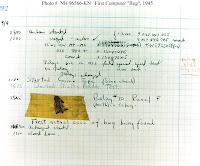 ms, an investigation showed that there was a moth trapped between the points of Relay #70, in Panel F. The operators removed the moth and affixed it to the log. (See the picture above.) The entry reads: "First actual case of bug being found." The word went out that they had "debugged" the machine and the term "debugging a computer program" was born.
Although Grace Hopper was always careful to admit that she was not there when it actually happened, it was one of her favorite stories. Grace Hopper also reported that the term "bug" was used to describe problems in radar electronics during WWII.
DIAGRAM OF FIRST NOTED COMPUTER BUG LOCATED ABOVE.
 ms, an investigation showed that there was a moth trapped between the points of Relay #70, in Panel F. The operators removed the moth and affixed it to the log. (See the picture above.) The entry reads: "First actual case of bug being found." The word went out that they had "debugged" the machine and the term "debugging a computer program" was born.
Although Grace Hopper was always careful to admit that she was not there when it actually happened, it was one of her favorite stories. Grace Hopper also reported that the term "bug" was used to describe problems in radar electronics during WWII.
DIAGRAM OF FIRST NOTED COMPUTER BUG LOCATED ABOVE.
Wikipedia Entry: http://en.wikipedia.org/wiki/Software_bug
Subscribe to:
Posts (Atom)

 Posts
Posts


